Making Tax Digital VAT Guide
Making Tax Digital for VAT, often called MTD for VAT, changes how VAT registered businesses keep records and file VAT returns. Instead of keeping paper records and typing figures into a separate form, businesses keep digital records and send their VAT return data to HMRC through compatible software. This guide explains what Making Tax Digital for VAT is, who it applies to, how compatible software and digital record keeping work, how to file a VAT return through MTD, and how deadlines and penalties work in general terms.
It is general information only and not tax advice. MTD rules can depend on your VAT position and your software. Always check the current HMRC guidance or ask a qualified professional before you act. If you want to check your return figures, our VAT return calculator can help you work out the VAT on your sales and purchases.
What Is Making Tax Digital for VAT
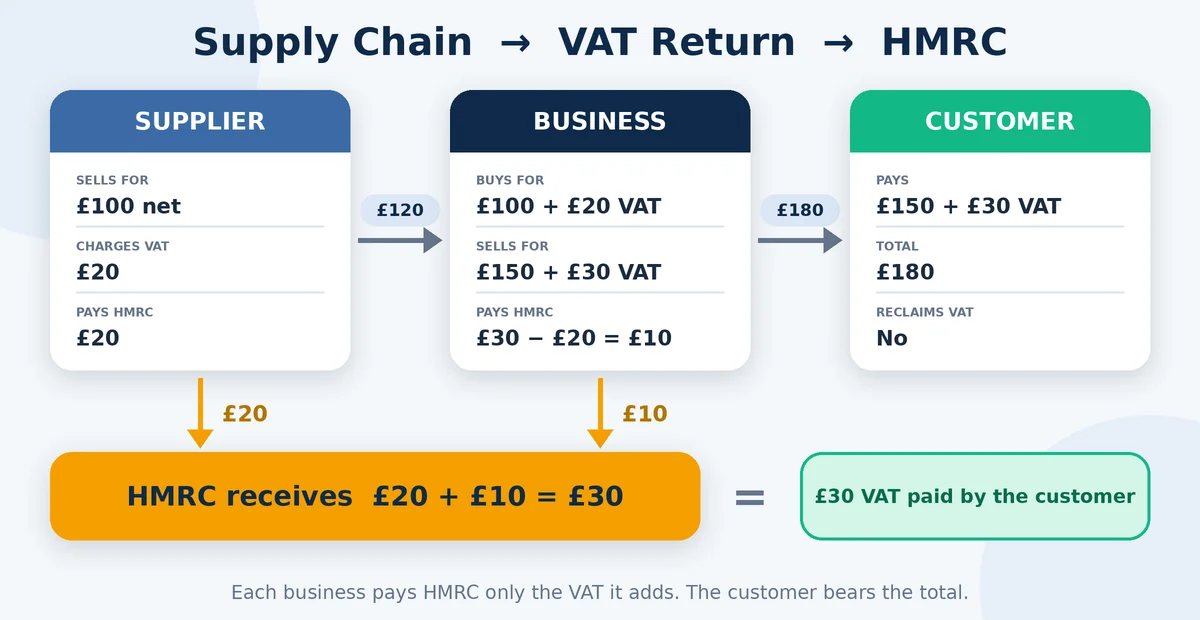
Making Tax Digital is HMRCs programme to move tax record keeping and filing online. For VAT, it means that VAT records must be kept digitally and VAT returns must be filed using software that can link to HMRC. The aim is to reduce errors that come from manual copying of figures, to keep records in one place, and to make the return process more consistent from period to period.
In practice, MTD for VAT has two main parts. The first part is digital record keeping. You keep your VAT records in compatible software, so your sales, purchases and VAT amounts are stored digitally. The second part is digital filing. You prepare and submit your VAT return through that software, and the software sends the return data to HMRC. You do not file the return by typing figures into a separate HMRC web form.
MTD does not change the basic VAT rules. You still need to work out which supplies are taxable, exempt or zero rated, which input VAT you can reclaim, and how much VAT you owe or are due to be repaid. MTD changes how you keep the records and how you send the return, not the VAT calculation itself. Our business VAT calculator can help you check VAT on your sales and purchases while you get used to the new process.
Who Does Making Tax Digital for VAT Apply To
Making Tax Digital for VAT generally applies to VAT registered businesses. That includes businesses that had to register for VAT and businesses that chose voluntary registration. If your business is VAT registered, you should assume that MTD applies to you unless HMRC guidance says that an exemption or a different route applies in your case.
Some businesses may have special circumstances. For example, a business may be exempt from MTD on the grounds of age, disability or location, or because it is not reasonably practicable to use digital tools. HMRC guidance explains the position for those cases. If you think an exemption may apply to you, check the guidance and keep a note of the basis for your position. Do not assume that you are exempt because your business is small or because you have always filed in another way.
If you are not yet VAT registered, MTD for VAT does not apply to you yet, but it will matter once you register. Learn more in our guide on how to register for VAT in the UK. If you are already registered and you are still filing in an older way, move to MTD as soon as you can and seek advice if you are unsure how to start.
Compatible Software and Digital Record Keeping
Compatible software is software that can keep digital VAT records and send VAT return data to HMRC through the MTD service. HMRC maintains a list of compatible software, and businesses can choose the product that fits their needs. Some businesses use full accounting software. Others use bridging software that links a spreadsheet to HMRC, where the spreadsheet itself is kept in a digital form that meets the rules. The key point is that the software must be able to keep the required records digitally and to send the return to HMRC without manual retyping of the return figures.
Digital record keeping means that your VAT records are stored digitally in a form that your compatible software can use. You should record each supply, the date of the supply, the value of the supply, and the VAT charged or paid, along with the details your software asks for. Keep digital copies of invoices and receipts where your software allows it, so you can check a figure later if you need to. Good digital records make returns faster and make it easier to spot errors before you file.
- Choose compatible software that fits your business and that you can use consistently.
- Keep sales, purchases and VAT amounts in digital form, not only on paper.
- Record each supply with its date, value and VAT amount.
- Keep digital copies of invoices and receipts where possible.
- Check that the software can send the return to HMRC through MTD.
It also helps to keep your records up to date through the VAT period, rather than entering everything at the return deadline. Regular updates reduce the chance of missing a sale or a purchase, and they make the return check much easier. If you use an accountant or a bookkeeper, agree who will enter records, who will check them, and who will file the return.
Filing VAT Returns Through Making Tax Digital
Filing a VAT return through MTD follows a clear pattern. First, you keep your records in compatible software through the VAT period. Second, you check the return figures in the software. The software will work out the VAT you charged on sales, the eligible VAT you paid on purchases, and whether you owe HMRC money or are due a repayment. Third, you submit the return to HMRC through the software. The software sends the return data directly to HMRC.
- Keep digital records in compatible software through the VAT period.
- Check the return figures in the software before you file.
- Make sure sales, purchases and reclaimable VAT are complete and correct.
- Submit the return to HMRC through the software.
- Keep a note of the submission and the return period it covers.
Before you submit, check the figures carefully. Compare the return total with your own records, check for missing invoices, and look for any large or unusual amounts. If a figure looks wrong, fix the record in the software and check the return again before you file. Once you have filed, keep the records for the return period so you can answer questions later. You can learn more about the reclaim side of the return in our guide on how to reclaim VAT.
Deadlines and Penalties
You must file each VAT return and pay any VAT due by the deadlines that apply to your VAT period. The deadlines depend on your VAT period and on how you pay. Check your VAT account for your return dates and payment dates, and set reminders for each period. Do not rely on memory alone, because a missed deadline can lead to extra cost and extra work.
Late filing and late payment can lead to penalties and interest. The exact outcome depends on the facts, including how late the return or payment is and whether there is a pattern of late filing. HMRC may also charge interest on VAT paid late. Keep clear records so you can show when a return was due, when it was filed, and when payment was made. If you realise you have missed a deadline, file and pay as soon as you can and seek advice if the amounts are large.
Good habits help you meet deadlines. Keep records up to date through the period, check the return early, and leave time to fix errors before the deadline. If you expect a problem, for example because a key record is missing, deal with it early rather than leaving the return to the last day. If you need to correct a return after you have filed it, check the HMRC guidance for the correct way to do it.
Getting Started with Making Tax Digital
- Confirm that your business is VAT registered and that MTD applies to you.
- Choose compatible software and set it up for your VAT periods.
- Move your VAT records into the software and keep them up to date.
- Check a test return in the software before your first live filing.
- File each return through the software and pay any VAT due by the deadline.
Check Your VAT Figures
Once your MTD process is set up, check your VAT figures before each return. Our VAT return calculator can help you check the VAT on your sales and purchases, and our business VAT calculator can help you work out VAT on sales and purchases while you prepare your records.
Frequently Asked Questions
What is Making Tax Digital for VAT?
Making Tax Digital for VAT is the HMRC system that requires VAT registered businesses to keep digital VAT records and to file VAT returns using compatible software. It replaces manual filing and paper based record keeping for VAT returns.
Who does Making Tax Digital for VAT apply to?
Making Tax Digital for VAT generally applies to VAT registered businesses. That includes businesses that registered voluntarily as well as businesses that had to register. If you are unsure whether it applies to you, check the current HMRC guidance or ask a qualified professional.
What software do I need for Making Tax Digital?
You need compatible software that can keep digital records and send VAT return data to HMRC through the Making Tax Digital service. HMRC maintains a list of compatible software. Choose software that fits the size of your business and that you can use consistently.
How do I file a VAT return through Making Tax Digital?
You keep your VAT records in compatible software, check the return figures in that software, and submit the return to HMRC through the software. The software sends the return data directly to HMRC, so you do not file by typing figures into a separate HMRC form.
What are the deadlines for Making Tax Digital VAT returns?
You must file each VAT return and pay any VAT due by the deadlines that apply to your VAT period. The deadlines depend on your VAT period and your payment method, so check your VAT account and set reminders for each period. Late filing and late payment can lead to penalties and interest.
What happens if I miss a Making Tax Digital deadline?
If you miss a filing or payment deadline, HMRC may charge a penalty and interest may apply, depending on the facts. If you realise you have missed a deadline, file and pay as soon as you can, keep clear records, and seek advice if the amounts are large.
VAT Calculator provides VAT calculations and information for general informational purposes only. Calculator results are estimates and should not be considered tax, legal, accounting, or financial advice. VAT rates and rules may change, so please verify important information with official sources or a qualified professional before making financial or tax decisions.